What’s New » Try @RISK 5.0 at the Palisade User Conference » DecisionTools Suite for Excel 2007 » Free Live Webcast: Nonlinear Feedback Loops using @RISK Case Study Product Spotlight Palisade Analytics Ask Amy Tech Tips
» Brazil » Europe » Latinoamérica » Asia-Pacific
» Risk and Decision Assessment Training using @RISK, Part II » Project Risk Assessment using @RISK for Project
Society of Actuaries Annual Meeting and Exhibit INFORMS Annual Meeting 2007 SPE Annual Technical Conference and Exhibition - 2007 38th Annual Meeting of the Decision Sciences Institute - DSI 2007 » Europe FERMA BPPM European Banking and Insurance Fair » Asia-Pacific ISEC Conference AIPM PMI New Zealand International Conference on Operations and Quantitative Management AusBiotech 2007 SPE Asia Pacific Oil and Gas Conference RMIA
|
![]() |
|||
Try @RISK 5.0 at the With sessions already planned on topics like utilities regulation, demand forecasting, environmental cleanup, and energy risk assessment from companies like Suncor, BC Hydro, and FutureMetrics LLC, attendance is on track to beat last year. Check out the program and register today. There are still a couple slots available for presenting case study applications of Palisade software. If you have a case study you’d like to share on your use of @RISK, PrecisionTree, NeuralTools, or any other product, we’d love to hear from you. » Submit case study proposal $199 Hotel Rooms Going Fast » reservations@alexanderhotel.com


DecisionTools Suite for Excel 2007 The DecisionTools Suite 4.5.7 update will make the following component products compatible with Excel 2007:
Updates for these products are also available individually. If your maintenance plan has lapsed and you are not a student or faculty member, there is a $500 charge for this update.
100% Excel
Free Live Webcast:
@RISK in Corporate Finance Dr. Joaquin holds advanced degrees in theoretical statistics and business administration, and he is an advocate of Monte Carlo simulation and @RISK because they offer a pragmatic approach to dealing with the uncertainties that are inherent in any business decision. He guides students in using @RISK to address an array of thorny problems in real options analysis—his area of research specialization—as well as in capital budgeting, cash budgeting, capacity planning, and international portfolio diversification.
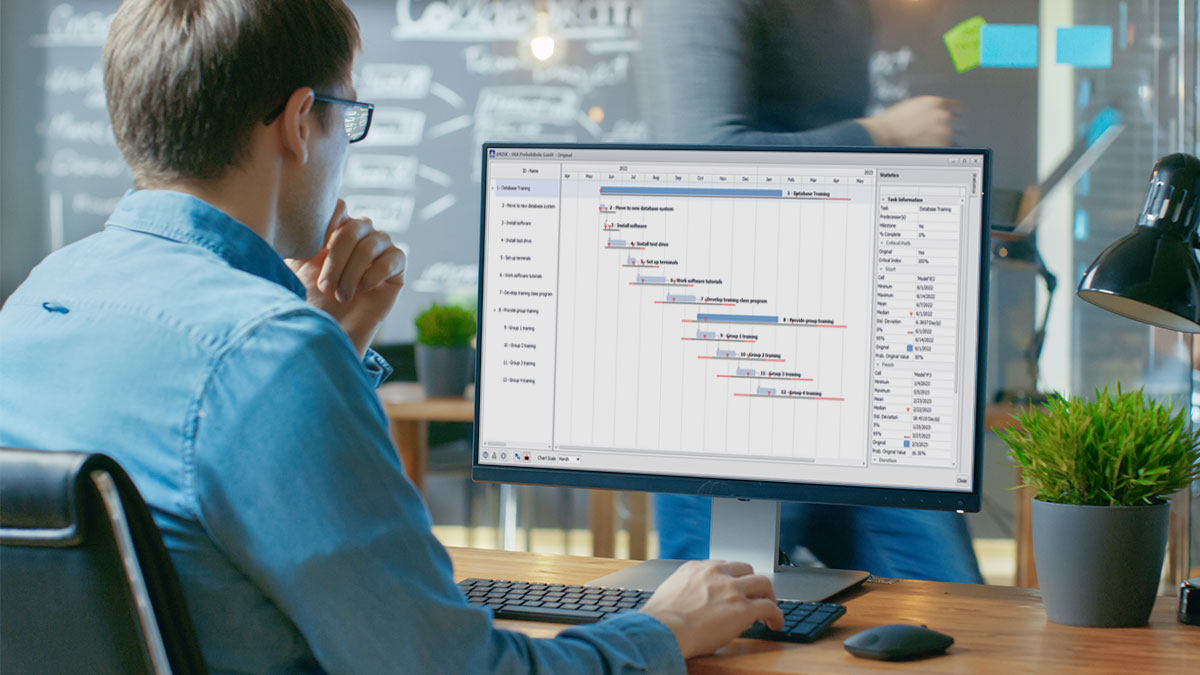
Modeling in @RISK for Project @RISK for Project is an add-in to Microsoft Project that uses Monte Carlo simulation to represent thousands of different outcomes in your project plans. More than any other software package, @RISK for Project makes representing your project easy—and accurate. 38 Distribution Functions - @RISK for Project offers 38 probability distribution functions to help to accurately describe uncertain costs, durations, or other variables. Distribution Fitting – Not sure which distribution function to use? @RISK for Project can read historical data on a particular variable and give you the exact distribution function that best fits your data. Probabilistic Branching - Probabilistic branching lets a project branch from one task to any number of other tasks during simulation. Account for chance events in your project plans and see the impact on your outputs. IF/THEN Conditional Branching - Build logic into your project plans. With IF/THEN Conditional Branching, if a pre-defined condition occurs during simulation, @RISK for Project will change a project value or branch to another task. Control values and branching between tasks using logic statements that you define. Probabilistic Calendars - Often you need to model the probability of work stoppages due to weather, strikes, or other unforeseen events. By setting up Probabilistic Calendars with @RISK for Project, you can apply working and non-working probabilities to any calendar event in Project. » Find out more about @RISK for Project » A search engine "listens" to music to help you Help for those looking for new music may be on the way in the form of a search tool funded by the National Science Foundation that is claimed to identify aesthetic similarities between pieces of music. It is a “similarity search engine,” based partly on neural networks. » Banking Contact Centers Beat Internet for A large internet-based service provider found that, in the UK banking industry, it is faster to phone contact centers for basic information than to use the internet. Furthermore, only 30% of banks had implemented natural language eService solutions that use neural network technology to analyze questions in order to find the best response. » Terminal-Based Debit Fraud Control Seeking to contain a growing form of payment card fraud - debit transactions - the NYCE Payments Network LLC has called upon Fair Isaac’s fraud alert system, which uses neural networks to identify suspect transactions. The pattern-based profiling system updates continually and therefore becomes ever smarter. » Artificial examiners put to the test The University at Buffalo, New York, is developing software to fully automate the essay-marking process. Exam scripts are scanned into the computer, the software reads the handwriting and uses neural network technology to translate it into computer type and grades the response as an examiner would. » Image processing a booming market Starting in 2010, smart cameras with neural networks are expected to have the capability of categorizing objects into many different classes – an important feature when it comes to automatic sorting. » Leveraging Your Gains In the mortgage banking industry, property owners that owe more than their properties are worth are described as being “underwater.” We'll follow a leveraged investment as it builds equity, loses value, goes underwater and then recovers. Using Monte Carlo simulation we can estimate the probability of going underwater. » Online Service for CDO Industry Incorporates In the mortgage banking industry, property owners that owe more than their properties are worth are described as being “underwater.” We'll follow a leveraged investment as it builds equity, loses value, goes underwater and then recovers. Using Monte Carlo simulation we can estimate the probability of going underwater. » Lack Of Flexibility Can Hurt Retirement Plans » Is Language Innate or Learned? Researchers have designed a novel computer program using neural networks that, through listening to samples of speech, sheds light on how human infants learn language. » Decision Tree Controls Vaccination for In response to the recent outbreak of foot and mouth disease in England, the Department for the Environment, Food, and Rural Affairs confirmed its contingency planning protocol. It stipulated that any decision to vaccinate is based on a veterinary assessment of risk and follows the FMD vaccination decision tree in the contingency plan. » Cricket batsmen in virtual studio Sports development experts are using performance-predicting neural network software, which has the ability to learn from its own mistakes. "You feed information into it and get it to predict outcomes like when players might be injured, or averages, or results…” » Beijing warned of lighting during Olympic season Two meteorologists warned that Beijing would encounter a possibly high frequency of lightning during the Olympic season next summer. The China Meteorological Administration will use neural networks to identify areas most vulnerable to lightning strikes.
Expert Answers to Technical Questions Dear Amy, How do I view the effect of changes to parameters on more than one distribution? —D.S. Dear D.S., I recommend using the Overlay Graph feature in @RISK to view the effect of changes to parameters on various distributions. To use this feature begin by clicking on the ‘Define Distributions’ icon in the @RISK toolbar. Then click on the button labeled, ‘Dist…’ to bring up the Distribution Palette. Click on the distribution that you would like to use as your primary distribution and enter values for the parameters. Once the primary distribution is displayed, right-click on the distribution graph and select ‘Add Overlay’. The distribution palette will appear once again. Click on the distribution that you’d like to use for the overlay graph. You’ll see the overlay added to the graph. The parameter values for the overlay graph will now appear to the left of the graph and you can adjust them as you like.
|
||||
E-mail comments or suggestions to:sales@palisade.com ©2007 Palisade Corporation, 798 Cascadilla Street, Ithaca, NY 14850 USA $unsub |
||||