




Maker of the world's leading risk and decision analysis software, @RISK and the DecisionTools Suite
ENGLISH I  ESPAÑOL I  PORTUGUÉS I  FRANÇAIS I  DEUTSCH I 日本語
Live Chat


Have you ever worked on a multimillion-dollar project
where the project plan was little more than a
collection of guesses? Or managed a project where
the number of risks made the project unmanageable?
Every year numerous projects finish late or over
budget, or get cancelled outright because the project
manager had no tools to assess and manage risk.
@RISK for Project helps project managers realize the
effects of uncertainty, communicate realistic project
forecasts and allocate resources effectively.

@RISK for Project
Shows You Many
Possible Outcomes

@RISK for Project uses Monte Carlo simulation to
show you many possible outcomes in your project – and tells you how likely they are to occur. This means that you finally have, if not perfect information, the most complete picture possible. You can determine which tasks are most important and then manage those risks appropriately. While no software package can predict the future, @RISK for Project can help you choose the best strategy based on the available information. That’s not a bad guarantee!

The power of Monte Carlo simulation lies in the picture of possible outcomes it creates. Simply by running a simulation, @RISK for Project takes your project model from representing just one possible outcome to representing thousands. With @RISK for Project, you can answer questions like, “What is the probability of completing this milestone on time and under budget?” or “What are the chances that this project phase will be completed by this day?”

Define Uncertainty with Ease
Replace uncertain values in your spreadsheet with @RISK probability distribution functions.  You’ve probably heard of some of these, such as normal (“bell curve”), uniform, and triangular distributions. Choosing which @RISK distribution function to use is easy. @RISK for Project comes with a distribution viewer that lets you preview various distributions before selecting them. You can also use your own historical data and @RISK for Project’s integrated data fitting tool to select the best function and the right parameters.

Present Results with Stunning Graphs
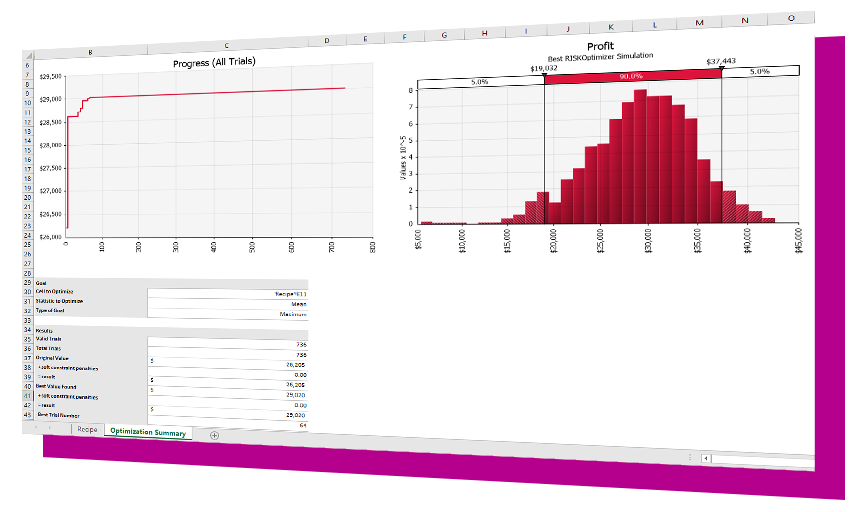
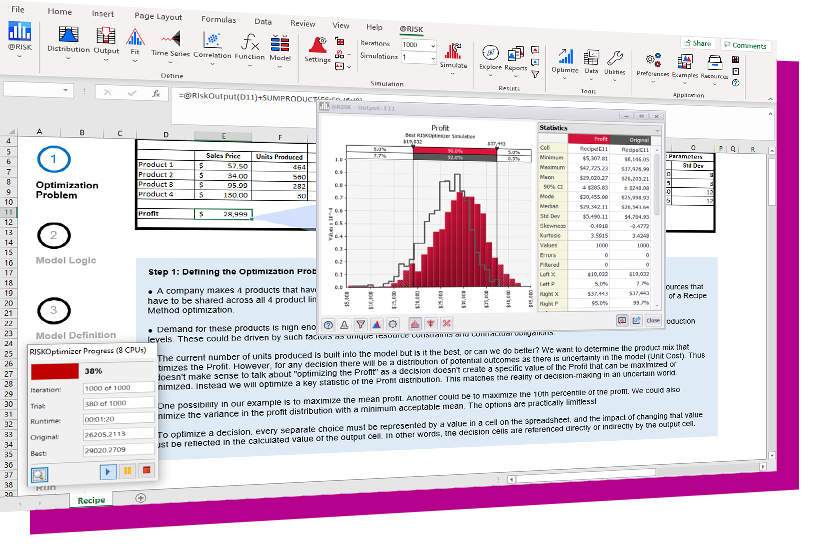
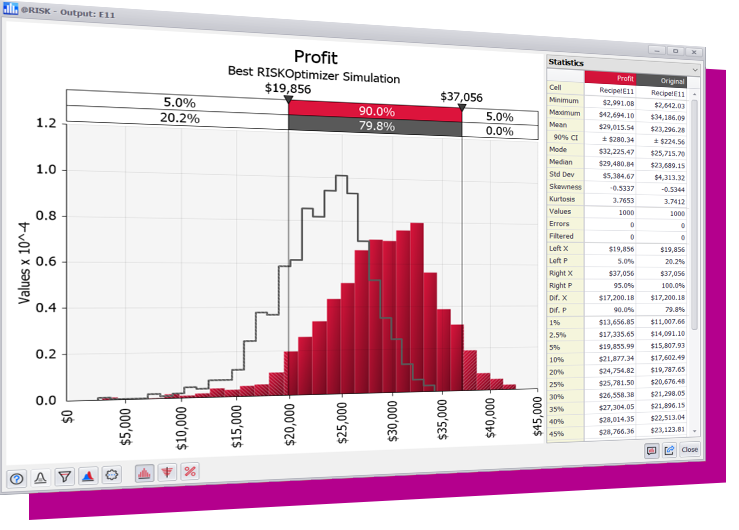
@RISK for Project provides a wide range of graphs for interpreting and presenting your results to others. The @RISK Gantt Chart lets you see simulation results directly in Project’s native Gantt Chart. Histograms and cumulative curves show the probability of different outcomes occurring. Use overlay and summary graphs for more advanced comparisons. Right-click menus and handy toolbars make navigation a snap. You can also generate a one-page, ready-to-print Quick Report of statistical results and graphs! 

Identify the Most Important Tasks
@RISK for Project provides you with Sensitivity and Scenario Analyses to determine the critical factors in your models. Use Sensitivity Analysis to rank the uncertain factors in your model according to the impact they have on your outputs. See the results clearly with an easy-to-interpret Tornado diagram, then take appropriate management action.

Conditional Modeling and Contingency Planning
The Professional version of @RISK for Project includes a set of branching features that enable you to build in contingency plans if certain events occur. Account for chance events in your model with ease.

Two Editions to Meet Your Needs


37 Built-in Distribution Functions
Integrated Distribution Viewer
Risk Categories
"Vary” Function
Correlation of Inputs
Sensitivity & Scenario Analysis
Variety of Result Graphs and Charts 
Risk Results in Gantt Chart
VBA Macro Support
Integrated Data Fitting
Probabilistic Branching
IF/THEN Conditional Branching
Probabilistic Calendars
Global Variables
Parameter Entry Tables
@RISK Standard
for Project


@RISK Professional
for Project


@RISK for Project Features & Benefits

See complete table
FEATURES
Seamless integration into Microsoft Project

Advanced simulation engine
37 built-in distribution functions

Distribution viewer and data fitting
Correlation of inputs

Presentation-quality graphs

One-click Quick Reports

@RISK Gantt Chart

Reporting in Excel

Sensitivity and Scenario Analysis


Critical Indices

Probabilistic and Conditional Branching
Vary” function

Risk Categories


Global Variables

Parameter Entry Tables

BENEFITS
No need to export data to perform risk analysis; get up to speed quickly
Fast, thorough analysis
Represent virtually any uncertain factor for accurate modeling
Easy and accurate definition of uncertain factors
Represent dependency between related variables for accurate modeling
See the impact of risk and communicate to stakeholders effectively
See summary of charts and graphs pre-formatted for one page
See the true critical path so you can manage resources effectively
All graphs and charts can be exported to Excel for easy distribution to others
Identify the individual tasks that have the most impact on results, and the particular scenarios that lead to certain results
Assess task importance by seeing the percentage of time it appears on the critical path
Set up contingency plans for chance events
Vary a value around the mean for more modeling flexibility
Apply the same uncertainty to similar tasks within a category; save time by not setting up tasks one by one
Hold values to be referenced by any @RISK for Project calculation for modeling convenience
Quickly add or change @RISK function parameters without opening each function individually


@RISK for Project Industries & Applications

INDUSTRY
AEROSPACE
CONSTRUCTION


DEFENSE

ENVIRONMENT
INFORMATION TECHNOLOGY
MANUFACTURING

MINING
 
OIL AND GAS
 
PHARMACEUTICALS
 
TRANSPORTATION
  » Case Studies
SAMPLE APPLICATION
Cost estimating
Schedule estimation
Contingency planning
Budget projection
Resource planning
Aircraft and equipment procurement
Troop deployment and mission planning
Toxic cleanup planning
Systems rollout scheduling
Production scheduling
Plant shutdown
Blast planning
Reclamation of mining sites
Drilling rig construction
Exploration analysis
Facility planning
Research and development projects
Government regulation compliance


PMI Approved
PMI recommends Monte Carlo simulation software tools such as @RISK for Project for quantitative risk analysis. Palisade Corporation is a PMI Registered Education Provider, so Project Management Professionals who attend Palisade training seminars can earn valuable Professional Development Units.

Compatibility: Compatible with PC MS Project 2000 and higher and PC Windows 2000 and higher.


Contact:
Palisade Corporation
798 Cascadilla Street
Ithaca, NY 14850-3239
800 432 RISK (US/Can)
+1 607 277 8000
+1 607 277 8001 fax
sales@palisade.com
Palisade Europe
+44 1895 425050
sales@palisade-europe.com
Palisade Asia-Pacific Pty Limited
+61 2 9252 5922
sales@palisade.com.au
Palisade Latinoamérica
+1 607 277 8000 x318
ventas@palisade-lta.com
www.palisade-lta.com
Palisade Brasil Ltda
+55 (21) 2586-6334 tel
+1 607 277 8000 x318 tel
vendas@palisade.com
www.palisade-br.com